RK3576 Core Board Selection Guide for Edge AI Projects
Edge AI is transforming how intelligent devices process information and make decisions. Rather than transferring all data to the cloud, edge AI systems analyze it locally, enabling faster responses, lowering reliance on network connections, and strengthening data privacy.
This transition is introducing new demands for embedded computing hardware. Robotics, industrial inspection equipment, smart cameras, intelligent terminals, and machine vision devices all require platforms that balance processing power, AI acceleration, energy consumption, connectivity, and compact size.
The Rockchip RK3576 is an octa-core processor platform intended for a range of intelligent embedded applications. Its integrated NPU delivers up to 6 TOPS of AI computing performance, providing a foundation for edge AI device development.
Selecting an RK3576 Core Board, however, requires more than reviewing processor specifications. Developers must also assess memory capacity, interfaces, operating system support, thermal design, and the needs of the intended application.
This guide outlines the main factors to consider when choosing an RK3576 Core Board for an edge AI project.
1. Define Your Edge AI Computing Requirements
Before comparing hardware configurations, determine what the device must do.
Edge AI applications can have very different computing needs.
For example:
- Industrial machine vision: Requires image capture, on-device image processing, object detection, and communication with industrial equipment.
- Service and delivery robots: Must process sensor data, handle navigation tasks, and coordinate movement and system operations.
- Smart cameras: Need image processing and video encoding and decoding, and may also perform AI inference locally.
- Intelligent HMI terminals: Bring together touchscreen interaction, graphical interfaces, device monitoring, and selected AI capabilities.
- Smart retail devices: May use cameras and AI models for customer analytics, product identification, or interactive services.
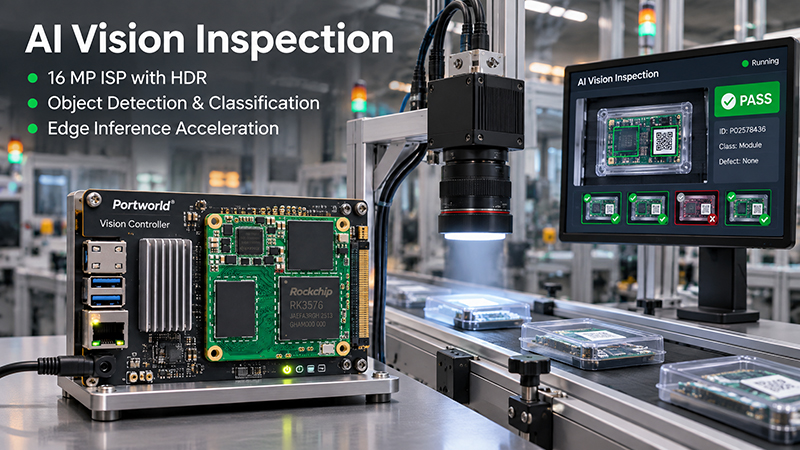
RK3576 core board AI Visual Inspection Applications
These applications do not all need the same hardware configuration.
A device running a lightweight object detection model may have different requirements than a machine vision system that processes multiple high-resolution video streams.
Start by identifying:
- Which AI models will run locally?
- How many camera or sensor inputs are required?
- What image resolution and processing speed are expected?
- Will the system run a graphical interface alongside AI workloads?
- Does the application need continuous 24/7 operation?
- Which communication interfaces are required?
A clear understanding of these requirements makes it easier to select the right RK3576 hardware configuration.
2. Assess CPU, GPU, and NPU Performance
Edge AI devices seldom depend on a single processing component. The CPU, GPU, and NPU work together, each handling different types of workloads.
- CPU: System Control and General-Purpose Processing
- The RK3576 uses an octa-core CPU architecture:
- 4 × Cortex-A72 cores, operating at up to 2.2GHz
- 4 × Cortex-A53 cores, operating at up to 1.8GHz
The CPU manages operating system tasks, application logic, peripheral communications, data handling, and other general-purpose computing operations.
For example, in an industrial inspection device, the CPU may coordinate camera input, manage application processes, communicate with external controllers, and send processed results to other systems.
When assessing an RK3576 Core Board, determine whether the CPU has enough capacity to support both AI-related tasks and the application’s background processes.
GPU: Graphics and Visual Processing
The RK3576 features a Mali-G52 MC3 GPU.
GPU performance matters when a device must render graphical interfaces, display camera feeds, or run supported graphics and parallel-computing workloads.
This capability is especially relevant to smart terminals, robot control interfaces, and vision-based devices that combine AI processing with real-time visual interaction.
NPU: Dedicated AI Acceleration
A key advantage of the RK3576 is its integrated NPU, which delivers up to 6 TOPS of AI computing performance.
The NPU accelerates supported neural-network inference workloads, enabling embedded devices to handle AI tasks locally without relying entirely on cloud processing.
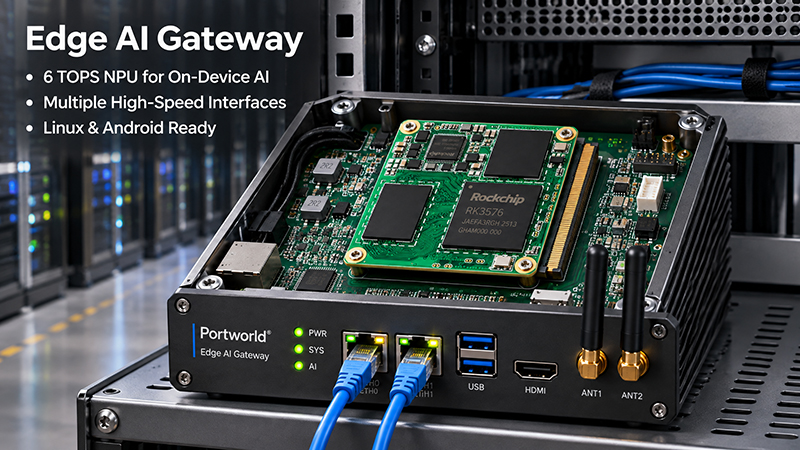
RK3576 Core board Edge AI Gateway
Potential applications include:
- Object detection and recognition
- Image classification
- Visual inspection
- Person or vehicle detection
- AI-assisted monitoring
- Intelligent device recognition
However, TOPS is only one measure of AI performance. Actual inference speed also depends on model architecture, input resolution, quantization, memory bandwidth, software optimization, and runtime support.
Before choosing a board, confirm that your AI model can be converted and deployed using the available RK3576 software development tools and NPU runtime.
3. Select the Appropriate Memory and Storage Configuration
Memory is a key factor in edge AI applications.
AI inference, image processing, video decoding, and graphical interfaces can all use significant amounts of system memory. When capacity is inadequate, the device may experience performance constraints while handling multiple processes at once.
Portworld’s RK3576 SoM comes with 4GB of onboard LPDDR4 memory.
This configuration can provide a starting point for a range of embedded applications, including:
- AI-enabled industrial terminals
- Smart control panels
- Compact machine vision devices
- Robotics control systems
- Intelligent commercial displays
Actual memory needs vary according to the AI model’s size, the operating system, application software, and the number of workloads running concurrently.
For instance, an application using a lightweight detection model and a basic interface may require far less memory than a system processing several camera streams alongside a sophisticated graphical application.
When evaluating a Core Board, check:
- Available RAM capacity
- Memory bandwidth
- Storage interface compatibility
- Operating system and application storage requirements
- Whether the memory configuration is fixed or customizable
It is also important to distinguish onboard RAM from external storage. Confirm the actual storage options supported by the module and its carrier board before finalizing the hardware design.
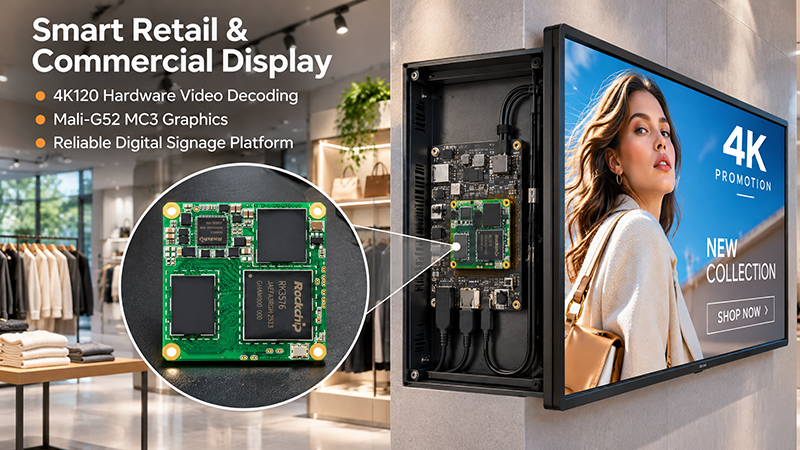
RK3576 Smart Retail Commercial Display Applications
4. Verify Interface Availability and Carrier Board Compatibility
A processor’s capabilities do not guarantee that every interface will be accessible on the completed embedded device.
The Core Board connects to a carrier board, which supplies the physical interfaces required by the application.
Portworld’s RK3576 SoM features a compact 38 × 38 mm form factor and a 240-pin board-to-board connector.
When choosing an RK3576 module, confirm that its carrier board supports all interfaces required by your project.
Key interface categories may include:
| Interface category | Typical application |
|---|---|
| Ethernet | Network communication and industrial connectivity |
| USB | Cameras, peripherals, and external devices |
| MIPI | Camera modules and display connections |
| HDMI or other display interfaces | External monitors and visual output |
| UART | Debugging and serial communication |
| I2C / SPI | Sensors and peripheral control |
| GPIO | Hardware control and signal input/output |
| PCIe | Supported high-speed expansion devices |
The exact interface availability depends on the SoM pinout, carrier board design, and software support. Not every interface listed above is necessarily exposed on every RK3576 board.
For industrial applications, also evaluate the number and type of communication ports required to connect sensors, controllers, and external equipment.
A well-designed carrier board can make the difference between a promising processor platform and a practical embedded product.
5. Assess AI Model Compatibility and Operating System Support
Hardware performance is only one element of an edge AI solution; software compatibility is just as important.
Depending on the board’s BSP and software configuration, the RK3576 platform can support Android and Linux-based development environments, including Ubuntu and other supported Linux distributions.
Before selecting a Core Board, verify the following:
AI model deployment
Confirm that your trained model can be converted to a format supported by the RK3576 NPU software stack. Model conversion, operator compatibility, quantization, and runtime versions may all influence deployment.
Operating system compatibility
Ensure that the chosen OS version has an appropriate BSP and device drivers, and supports the interfaces your application requires.
Development tools
Check that SDKs, documentation, sample code, debugging tools, and software support are available to your development team.
Application integration
If the project combines AI inference with camera input, touchscreen interaction, and industrial communication, test these functions together rather than assessing each one in isolation.
A practical approach is to validate the actual AI model and target peripherals in a proof of concept before finalizing the carrier board.
6. Assess Power Consumption and Thermal Design
Edge AI devices are often housed in compact enclosures where cooling space is limited.
While the RK3576 is built for embedded applications, its power consumption and heat output vary with CPU and NPU utilization, GPU workloads, attached peripherals, and overall system configuration.
For projects that require continuous AI inference, consider thermal design from the outset.
Pay attention to:
- Heat dissipation around the processor
- Enclosure materials and internal airflow
- Requirements for heat sinks or thermal pads
- Power supply stability
- Ambient operating temperature
- Performance during sustained workloads
For instance, a machine vision terminal installed inside an industrial cabinet may need a different cooling solution than a smart home control panel mounted on a wall.
Testing should run sustained AI workloads under expected operating conditions. This can reveal thermal throttling or stability problems before mass production.
Check Module Dimensions and Product Integration Requirements
A Core Board’s physical dimensions influence enclosure design, PCB layout, installation, and product maintenance.
Portworld’s RK3576 SoM measures 38 × 38 mm, making it well suited to compact embedded system designs.
Its 240-pin board-to-board connector links the module to the carrier board.
When assessing module integration, consider:
- Available PCB space
- Connector positioning and mechanical clearance
- Component height and enclosure constraints
- Power input and distribution
- Signal integrity and PCB layout
- Access for debugging and maintenance
A compact SoM can simplify the main system architecture, but the complete product still requires a carefully designed carrier board and enclosure.
For projects with customized interfaces or mechanical requirements, coordinating hardware and mechanical engineering teams early can help reduce later redesign work.
YC-Core3588 Core Board
Why Choose Portworld’s RK3576 SoM for Edge AI Development?
Portworld’s RK3576 SoM is built for embedded developers and manufacturers creating intelligent devices that need a balance of computing power, AI acceleration, and compact hardware integration.
Key specifications include:
- Processor: Rockchip RK3576 octa-core CPU
- CPU architecture: 4 × Cortex-A72 cores running at up to 2.2GHz + 4 × Cortex-A53 cores running at up to 1.8GHz
- NPU: Up to 6 TOPS
- GPU: Mali-G52 MC3
- Memory: 4GB onboard LPDDR4
- Module dimensions: 38 × 38 mm
- Connector: 240-pin board-to-board connector
- Operating systems: Linux, Ubuntu, and Android, subject to BSP support
Potential applications include industrial machine vision, robotics, intelligent terminals, smart control systems, and edge AI devices.
In addition to the module, Portworld offers engineering support for embedded product development, including hardware customization, carrier board integration, OS adaptation, and project-level system development.
From prototype evaluation through product integration and mass production, Portworld helps customers create embedded computing solutions tailored to their application requirements.
RK3576 Core Board Selection Checklist
Before making a purchasing or design decision, use this checklist to evaluate whether an RK3576 SoM fits your project.
| Selection factor | What to verify |
|---|---|
| AI performance | NPU capability and actual model inference performance |
| CPU performance | Capacity for system control and application workloads |
| GPU performance | Graphics and display requirements |
| Memory | RAM capacity and bandwidth |
| Storage | Supported storage options and required capacity |
| Interfaces | Compatibility with cameras, displays, sensors, and peripherals |
| Software | BSP, OS, SDK, drivers, and NPU runtime |
| Thermal design | Sustained performance under real workloads |
| Mechanical design | Module dimensions, connector, and enclosure |
| Customization | Carrier board, I/O, and software adaptation support |
The best Core Board is not necessarily the one with the highest theoretical computing performance. It is the one that meets the project’s actual requirements while keeping development complexity, integration cost, and long-term production risks under control.
Selecting an RK3576 Core Board for an edge AI project requires a complete evaluation of computing performance, AI acceleration, memory, interfaces, software compatibility, thermal design, and hardware integration.