Digital Signage for Education: Choosing the Right Smart Displays
In today’s fast-evolving educational landscape, digital signage displays have become an essential tool for schools, universities, and training centers. These smart displays provide a modern, interactive way to communicate with students, staff, and visitors, delivering information efficiently and enhancing the learning environment.
What is a Digital Signage Display?
A digital signage display is a screen or monitor that presents digital content such as announcements, schedules, multimedia lessons, advertisements, or emergency alerts. Unlike traditional bulletin boards or static posters, digital signage allows content to be updated in real time and managed remotely, making it ideal for dynamic educational environments.
Common uses in schools and universities include:
- Campus wayfinding and navigation
- Lecture hall announcements and schedule updates
- Event promotion and live streaming
- Cafeteria menus and cafeteria promotions
- Emergency alerts and safety instructions
- Interactive kiosks for student services
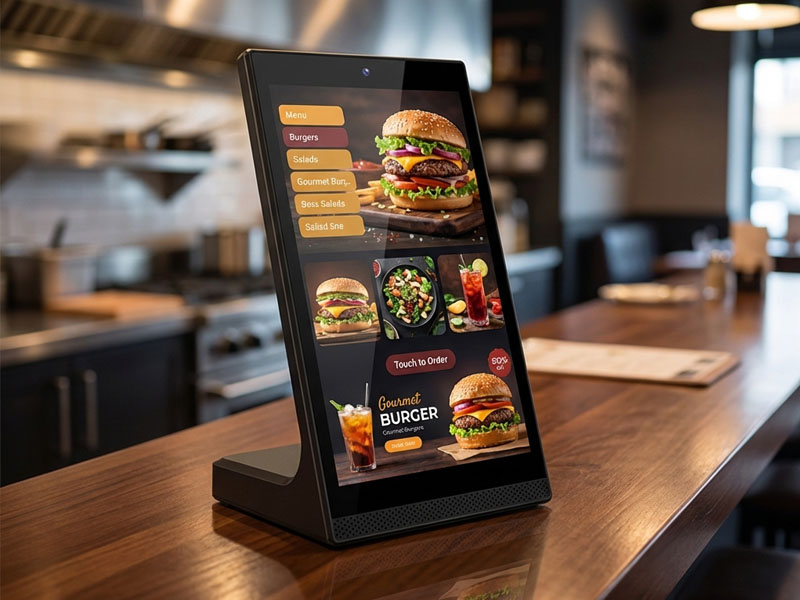
YC-L106
10.1-inch L-Shaped Digital Signage Display
Key Factors to Consider When Choosing Digital Signage Displays for Education
Selecting the right display is crucial for effective communication and engagement. Here are the main factors to consider:
1. Screen Size and Visibility
- Choose the size based on the space: hallways, classrooms, auditoriums, or common areas.
- Ensure visibility from different angles and distances.
2. Display Type and Brightness
- High-brightness screens are essential in areas with natural sunlight or well-lit spaces.
- IPS or LED panels provide consistent colors and wide viewing angles.
3. Touch Interactivity
- Touchscreen displays enable interactive learning, allowing students to engage with educational content directly.
- Options like capacitive or infrared touch can be chosen based on the application.
4. Connectivity Options
- Reliable Wi-Fi, Ethernet, or PoE (Power over Ethernet) support ensures stable content delivery.
- Integration with school CMS or scheduling systems can simplify content updates.
5. Operating System and Content Management
- Android-based digital signage displays are common due to their flexibility and compatibility with various apps.
- Some solutions also support Linux or Windows for custom software deployment.

YC-L106
10.1-inch L-Shaped Digital Signage Display
6. Durability and Reliability
- Displays in high-traffic areas should be durable and capable of 24/7 operation.
- Anti-glare, anti-fingerprint, or antimicrobial screens may be required in classrooms or cafeterias.
7. Security and Management
- Centralized remote management is essential for updating content across multiple screens.
- Security features prevent unauthorized access to sensitive information.

Wall-Mounted Digital Signage display
Portworld Solutions for Educational Digital Signage
Portworld provides a range of smart digital signage displays ideal for educational environments, including:
- YC-L106 10.1-inch vertical display – ideal for reception areas or interactive kiosks.
- YC-55MT Series Metal Case Wall-Mount Advertising Player – versatile wall-mounted displays for classrooms, hallways, and common areas.
Portworld also offers OEM/ODM customization, enabling schools to tailor hardware, software, and touch features according to their specific campus requirements.
Digital signage in education is more than just a screen—it’s a communication platform that enhances engagement, improves information delivery, and creates interactive learning opportunities. By considering factors such as screen size, brightness, interactivity, and reliability, schools can choose smart displays that meet both current and future needs. Portworld’s digital signage solutions offer reliable, customizable, and easy-to-manage displays that are perfect for modern educational environments.