ESP32 Smart Home Panels with Zigbee and MQTT Integration
Smart home systems are becoming increasingly connected, with lighting, HVAC, curtains, sensors, security devices, and other equipment working together through centralized automation platforms. As the number of connected devices grows, homeowners and system integrators need an intuitive interface that makes controlling these devices easier without relying entirely on mobile applications.
An ESP32 smart home panel offers a practical solution. With a touchscreen, Wi-Fi or Ethernet connectivity, and a customizable user interface, an ESP32-based wall panel can provide quick access to everyday smart home functions.
When combined with MQTT communication and a Zigbee gateway, an ESP32 smart home panel can become part of a flexible home automation architecture. MQTT enables communication between the panel and the smart home platform, while the Zigbee gateway manages wireless Zigbee devices such as lights, switches, sensors, and thermostats.
This combination provides a flexible approach to smart home control, especially for projects that require custom interfaces, lightweight hardware, and integration with multiple smart home protocols.
What Is an ESP32 Smart Home Panel?
An ESP32 smart home panel is a touchscreen control device powered by an ESP32 microcontroller. Unlike Android-based panels, it generally runs embedded firmware and lightweight graphical frameworks, such as LVGL, to provide a dedicated control interface.
The panel can show lighting controls, temperature readings, room status, scenes, device switches, and other smart home features.
Typical hardware features include:
- Touchscreen display for interactive operation
- ESP32 or ESP32-S3 microcontroller
- Wi-Fi and Bluetooth connectivity
- Ethernet support on selected hardware
- GPIO, UART, RS485, or other interfaces, depending on the design
- Customizable firmware and user interface
- MQTT communication for device control and status updates
Since ESP32 platforms are designed for embedded applications, they are well suited to smart home interfaces that perform dedicated tasks without requiring a full operating system or application environment.
How Zigbee and MQTT Work Together
Zigbee and MQTT play distinct roles in a smart home system.
Zigbee is a wireless mesh networking protocol for smart home devices. It is widely used for lights, sensors, switches, and other low-power IoT equipment.
MQTT is a lightweight messaging protocol that enables devices and software platforms to exchange data through a broker. It is often used to connect smart home control interfaces, automation software, gateways, and IoT devices.
In a typical smart home setup, Zigbee enables communication between wireless devices and a Zigbee coordinator, while MQTT links the smart home platform with connected interfaces.
For example:
- A Zigbee motion sensor detects movement.
- The Zigbee coordinator receives the sensor event.
- The smart home platform processes the event.
- The platform publishes updated information via MQTT.
- The ESP32 touchscreen receives the message and updates its interface.
The same setup also supports manual control. When a user taps a lighting button on the panel, it publishes a command via MQTT. The automation platform processes the command and sends the appropriate instruction to the Zigbee lighting device.
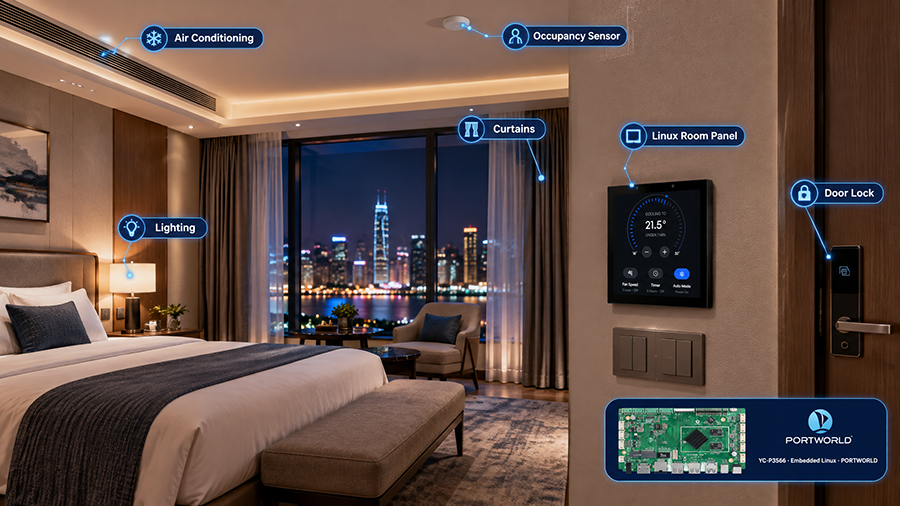
YC-P3566 Linux smart home control panel
Smart Home System Architecture
An ESP32 smart home control panel with Zigbee and MQTT integration can be structured in several layers.
1. ESP32 Touchscreen Panel
The ESP32 panel provides the local user interface. Users can control lights, set room temperatures, activate scenes, view sensor readings, and check system status.
The graphical interface can be tailored to the room layout, project specifications, or brand identity.
2. MQTT Broker
The MQTT broker coordinates communication among connected clients. The smart home panel publishes commands and subscribes to status topics.
Topics can be arranged by room, device, or function, helping keep the communication structure manageable as the system grows.
For example:
- home/livingroom/light/set
- home/livingroom/light/state
- home/bedroom/temperature
- home/scenes/movie_mode
The specific topic structure depends on the smart home platform and the project’s design.
3. Smart Home Platform
A home automation platform serves as the system’s central logic layer. It receives MQTT messages, manages devices, runs automation rules, and updates system states.
Platforms such as Home Assistant can integrate MQTT-enabled devices and Zigbee devices using compatible integrations and gateways.
4. Zigbee Gateway or Coordinator
The Zigbee coordinator manages the wireless Zigbee network, allowing Zigbee devices to join and communicating with the smart home platform.
Depending on the gateway hardware, the coordinator may connect to the automation system via USB, Ethernet, serial interfaces, or other supported connections.
5. Zigbee Smart Home Devices
The Zigbee network may include:
- Smart lights and dimmers
- Wireless switches
- Motion and occupancy sensors
- Door and window sensors
- Temperature and humidity sensors
- Curtain motors
- Smart plugs
- Other compatible Zigbee devices
This architecture enables the ESP32 panel to control and monitor Zigbee devices without requiring the touchscreen itself to act as a Zigbee coordinator.
MQTT Integration for Touchscreen Control
- MQTT is well suited to ESP32 smart home panels because it is lightweight and enables event-driven communication.
- Rather than repeatedly requesting device information, the panel can subscribe to MQTT topics and receive updates whenever a device’s state changes.
- Sending Commands
- When a user taps a touchscreen button, the ESP32 panel can publish a command to an MQTT topic.
For instance, a light control button could publish:
{
  "state": "ON"
}
The smart home platform receives each message and carries out the associated action.
Additional commands may include:
- Switching lights on or off
- Changing brightness
- Modifying HVAC settings
- Running predefined scenes
- Opening or closing curtains
- Receiving Device Status
- The panel can also subscribe to status topics.
If a light’s state changes through another interface, the smart home platform publishes the updated status. The ESP32 panel receives this update and refreshes its display.
This keeps controls consistent across multiple interfaces, such as wall panels, mobile apps, voice assistants, and automation systems.
Two-Way Communication
Two-way MQTT communication supports a more reliable user experience.
The panel sends control commands, and the smart home platform reports device status. This helps avoid cases where the touchscreen shows a light as ON even though the device is actually OFF.
Whenever possible, a well-designed interface should distinguish between a command that has been sent and a device state that has been confirmed.
Zigbee Integration Options for ESP32 Smart Home Panels
Several approaches are available for integrating Zigbee devices with an ESP32 smart home system.
Option 1: Use a Separate Zigbee Gateway
For an ESP32-S3 touchscreen panel, this is often the most straightforward architecture.
The panel connects to the smart home platform via Wi-Fi or Ethernet. A separate Zigbee coordinator manages the Zigbee devices, while MQTT or another supported interface links the panel to the automation platform.
Key advantages include:
- Simpler panel hardware
- Independent management of the Zigbee network
- Easier firmware development
- Greater flexibility when expanding the smart home network
- Centralized automation and device management
This approach is well suited to residential automation, smart apartments, hotel rooms, and multi-room control projects.
Option 2: Choose an ESP32 Platform with Built-In 802.15.4 Support
Certain ESP32 variants, such as the ESP32-C6 and ESP32-H2, have IEEE 802.15.4 radio hardware and can support Zigbee development when paired with compatible software and firmware.
However, native Zigbee support is not available across the entire ESP32 family. ESP32-S3 touchscreen panels need an external Zigbee radio or gateway to provide Zigbee connectivity.
For touchscreen products, keeping display and user interface tasks separate from Zigbee network management can simplify development and maintenance while allowing greater customization.
Option 3: Develop a Custom Zigbee Gateway
Projects that need more control over their hardware and communications architecture can use a Wi-Fi-enabled ESP32 platform alongside a separate 802.15.4 radio co-processor to build a custom gateway.
The gateway can bridge Zigbee devices to an IP network and connect to a smart home platform using MQTT or another integration method.
This option offers greater flexibility, but it also involves additional development, including implementing the Zigbee stack, creating gateway firmware, testing device compatibility, and managing the network.
Why Choose MQTT for Smart Home Touch Panels?
MQTT provides several benefits for embedded touchscreen applications.
Lightweight Communication
MQTT generates relatively little communication overhead, making it well suited to embedded devices with limited memory and processing capacity.
Flexible Device Integration
MQTT enables devices and software platforms to exchange information without needing to use the same hardware or operating system.
Real-Time Status Updates
Subscribed devices can receive status changes as they happen, helping the touchscreen keep its interface aligned with the current state of the smart home system.
Scalable Topic Structure
Topics can be arranged by room, device, or function, making it easier to grow from a single-room setup to a whole-home automation system.
Custom Automation
MQTT messages can initiate automation rules, scenes, and actions within the smart home platform, supporting project-specific requirements.
Applications of ESP32 Smart Home Panels
Whole-Home Lighting Control
A wall-mounted ESP32 panel can centralize lighting control across the home. Users can turn lights on or off, adjust brightness when supported, and activate preset lighting scenes.
HVAC and Climate Control
The panel can show room temperature, humidity, and HVAC status. It can also let users adjust heating, cooling, or fan settings through the smart home platform.
Scene Control
Custom scenes can coordinate several actions. For instance, a “Movie” scene could dim the lights, close the curtains, and adjust the room environment.
Multi-Room Smart Home Systems
ESP32 panels can be installed in multiple rooms. Each can display room-specific controls while connecting to the same smart home platform through MQTT.
Smart Home Monitoring
The panel can display data from Zigbee sensors, such as door status, motion detection, temperature, humidity, and other environmental information.
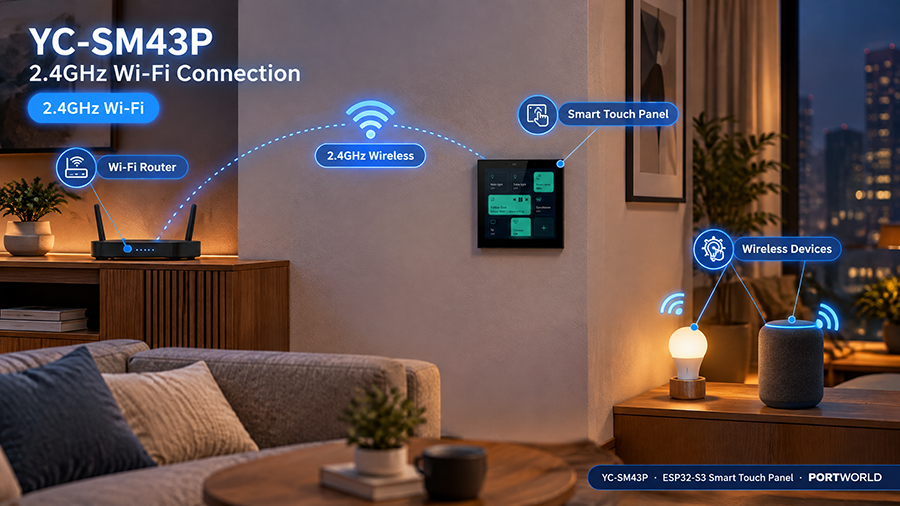
YC-SM43P smart home control panel
Portworld ESP32 Smart Home Panels
Portworld develops smart home touchscreen panels and embedded control hardware for OEM and ODM projects. For applications that need a streamlined interface and tailored smart home controls, ESP32-based panels offer a practical hardware platform.
YC-SM43P ESP32-S3 Smart Home Panel
The Portworld YC-SM43P is a compact 4-inch touchscreen panel designed for embedded control and smart home applications.
Key features include:
- ESP32-S3 dual-core processor
- 4-inch touchscreen with 480 × 480 resolution
- Support for the LVGL graphical interface
- 8MB PSRAM and 16MB Flash
- Wi-Fi and Bluetooth connectivity
- Ethernet and PoE options, depending on configuration
- RS485 interface
- Custom firmware and UI development
The YC-SM43P can be developed as a dedicated smart home interface, featuring customized room controls, lighting buttons, HVAC functions, scene selection, and sensor dashboards.
With suitable firmware development, MQTT communication can connect the panel to Home Assistant or other smart home platforms.
A separate compatible gateway can manage the Zigbee device network, enabling the ESP32 panel to serve as the touchscreen control interface without an onboard Zigbee radio.
ESP32 vs. Android Smart Home Panels
ESP32 and Android panels are designed for different project requirements.
| Feature | ESP32 Panel | Android Panel |
|---|---|---|
| Operating platform | Embedded firmware | Android OS |
| UI framework | LVGL or custom embedded UI | Android apps |
| Hardware resources | Lightweight | Higher computing resources |
| Customization | Firmware and UI development | OS, app, and UI customization |
| MQTT integration | Firmware implementation | Application-level integration |
| Zigbee integration | Gateway or compatible radio required | Gateway or compatible external hardware |
| Typical applications | Dedicated control interfaces | Rich apps, dashboards, and multi-purpose control |
ESP32 panels are suitable for dedicated interfaces where low resource consumption, fast startup, and customized firmware are priorities.
Android panels are more suitable for projects that require complex applications, multimedia functions, third-party software, or a broader app ecosystem.
The right choice depends on the UI complexity, hardware requirements, integration approach, and long-term maintenance plan.
ESP32 smart home panels with Zigbee and MQTT integration offer a flexible solution for dedicated smart home control interfaces. By combining a touchscreen interface with MQTT communication and a separate Zigbee gateway, developers can build systems that control lighting, HVAC, curtains, sensors, and other connected devices through a centralized automation platform.