How to Choose a Digital Menu Board Display for Restaurants
Digital menu boards are increasingly recognized as an effective solution for restaurants that require the ability to update prices, showcase new dishes, and present menus in a more engaging manner. From cafés and bakeries to fast-food outlets and large restaurant chains, digital displays enable the modification of menu content without the need to print new boards each time a product or price is altered.
Nevertheless, selecting a digital menu board display for a restaurant entails more than merely choosing a screen that fits above the counter. The display must be legible under the restaurant’s lighting conditions, accommodate the available space, support the necessary content management system, and function reliably throughout operating hours.
For restaurant proprietors, equipment suppliers, and system integrators, the optimal strategy is to assess the complete digital menu board solution, which includes the display, embedded hardware, software, connectivity, and installation method.
1. Selecting the Appropriate Screen Size for Your Restaurant
The size of the screen significantly influences how patrons perceive the menu and the volume of information that can be presented simultaneously. A small café with a limited beverage selection has distinct needs compared to a fast-casual restaurant that provides meals, sides, desserts, and promotional bundles.
For smaller counters, a compact display may suffice for showcasing beverages, desserts, daily specials, or promotional material. Conversely, larger dining establishments might find it advantageous to install multiple commercial displays adjacent to one another above the ordering area.
A multi-screen setup can effectively categorize the menu into distinct sections. For instance, one screen could feature burgers and meal combinations, another could highlight side dishes, while a third could display beverages and desserts. This method ensures that each category has ample space, preventing a cluttered appearance.
Prior to selecting a screen, it is essential to measure the available wall or ceiling area and gauge the maximum distance from which customers will view the menu. Take into account the number of menu items, the volume of text, and whether food images or promotional videos will be included.
Additionally, it is advisable to create a mock-up of the proposed layout before proceeding with installation. A screen that appears adequately sized when viewed up close may not offer sufficient text clarity for customers positioned at the rear of a line.
Portworld offers digital signage displays and integrated hardware solutions in various configurations. For restaurant projects, clients can discuss appropriate screen sizes, display orientations, mounting specifications, and hardware integration tailored to the desired menu layout. Should a standard product not fit the installation requirements, OEM/ODM customization may be available, contingent upon project feasibility.
YC-L106 Restaurant Banner
2. Choose the Correct Brightness for Indoor or Outdoor Applications
Brightness is a crucial specification when selecting a digital menu board display. A screen that functions effectively in a dimly lit restaurant may become challenging to read near large windows or under intense overhead lighting.
Brightness is quantified in nits, or candelas per square meter (cd/m²). For many indoor restaurant settings, commercial displays in the range of approximately 350–500 nits can serve as a reasonable baseline. Brighter environments may necessitate a higher-brightness panel, depending on factors such as reflections, viewing angles, and ambient light.
These values serve as guidelines rather than strict standards. The actual brightness should be assessed at the installation site, ideally during the brightest period of the restaurant’s operational hours.
Outdoor restaurant menus and drive-through displays require a distinct evaluation. Direct sunlight can greatly diminish screen visibility, thus the display may need significantly higher brightness, appropriate thermal management, and protection against weather conditions.
A standard indoor display should not be utilized outdoors merely because its screen appears sufficiently bright within the restaurant. Buyers must confirm the specific model’s operating temperature, environmental protection rating, and suitability for outdoor use.
Portworld provides digital signage hardware for commercial display applications, including indoor advertising displays and outdoor display solutions. For restaurant chains intending to implement window-facing promotions, outdoor menu boards, or drive-through systems, it is essential to verify the required brightness and environmental specifications prior to finalizing the configuration.
3. Take into Account Resolution, Orientation, and Menu Design
A digital menu board should facilitate customers in locating products and comparing prices effortlessly. While resolution is significant, it constitutes only one aspect of the overall viewing experience. Factors such as text size, contrast, layout, and screen orientation hold equal importance.
Full HD resolution is often adequate for many text-centric menus and promotional visuals. However, higher resolutions may be advantageous when the application necessitates more intricate visuals, dense information, or high-definition video. The choice should be based on the actual content rather than solely on resolution.
The orientation should also correspond with the menu structure.
Landscape displays are frequently utilized above restaurant counters as they allow ample space for multiple product categories, food images, and price combinations. Conversely, portrait displays can be effective in narrow areas, for entrance promotions, or for menus arranged in vertical lists.
When multiple screens are installed in conjunction, maintaining consistent dimensions and aligned content areas fosters a more organized look. The software templates should correspond with the physical layout to enable customers to navigate the menu intuitively.
For restaurant brands aiming to establish a standardized menu board system, Portworld can provide insights on display configuration, integrated hardware solutions, and tailored product specifications. Its OEM/ODM services can assist businesses in assessing a display setup that aligns with their desired layout and branding objectives.
YC-L106 Reception Desk Banner
4. Verify the Android Hardware and Operating System
A digital menu board encompasses more than just a display. It requires a system that can effectively play content and operate the necessary signage software.
Android-based digital signage displays are appealing for numerous commercial uses as they can directly run compatible advertising applications and content management clients on the device itself. Depending on the configuration of the system, this may lessen the necessity for an external media player.
When choosing an Android digital menu board, it is essential to consider the processor, RAM, internal storage, Android version, and media playback specifications. A system that showcases static menu images has different processing requirements compared to one that plays multiple high-resolution videos or operates an interactive ordering application.
Before acquiring hardware, it is crucial to verify software compatibility. Ensure that the intended signage application is compatible with the Android version, processor architecture, and installation method of the chosen device.
For projects that involve proprietary software, automatic application startup, or a tailored user interface, it is important to establish system-level requirements prior to mass production.
Portworld provides embedded motherboards and digital signage hardware tailored for commercial applications. Their hardware portfolio features Rockchip-based platforms, including RK3566 and RK3568 solutions, which can be assessed for suitable embedded display projects. The ultimate decision will depend on the software workload, required interfaces, operating system, and overall system architecture.
Additionally, Portworld offers support for Android customization for relevant hardware projects. Depending on the chosen platform, this may encompass application preinstallation, startup configuration, branding, and various other system modifications.
5. Assess Content Management and Menu Scheduling
One of the primary benefits of digital menu boards is the capability to modify content without the need to physically replace printed materials. Nevertheless, this convenience is contingent upon how the display receives and manages its content.
Prior to making a purchase, it is essential to ascertain how the restaurant staff will update the menu. A single establishment may only require local content playback, whereas a chain with numerous branches may necessitate centralized management across various locations.
An appropriate content management system (CMS) can facilitate functions such as:
- Uploading menu images and promotional videos.
- Updating prices and product details.
- Scheduling menus for breakfast, lunch, dinner, and late-night service.
- Managing content across multiple screens or restaurant locations.
- Assigning distinct playlists to different branches or display groups.
For instance, a café might schedule its breakfast menu to be displayed in the morning and transition to a lunch menu later in the day. A restaurant chain could disseminate a seasonal promotion to all branches without the need to visit each location individually.
Before choosing a CMS, ensure that it accommodates the necessary scheduling features, remote publishing capabilities, user permissions, and device management functionalities. If synchronization of prices or availability with a POS or ordering system is required, verify the essential software interfaces instead of presuming that the display can automatically handle this integration.
Portworld offers digital signage hardware and embedded system solutions that can be assessed for compatibility with third-party CMS platforms and tailored software. For projects with particular menu management needs, clients should validate software compatibility and the extent of integration prior to placing an order.
YC-L106 Bank Hall Banner
6. Select Appropriate Connectivity Options
Connectivity influences the ease with which a digital menu board can be installed, updated, and maintained.
Wi-Fi can facilitate installation when network cabling poses challenges, whereas Ethernet might be more suitable when a reliable wired connection is accessible. USB can enable local content updates or support compatible peripherals, and HDMI may be advantageous when an external media player or another video source is necessary.
The required interfaces are contingent upon the intended system architecture. A standalone Android display operating its signage application may necessitate a different setup compared to a display linked to an external player, POS system, or restaurant control platform.
If you are acquiring customized displays, compile a list of required interfaces before soliciting a quotation. Additionally, verify which ports are externally accessible and whether any supplementary connectors or adapters are required.
For restaurant chains and equipment manufacturers, standardized connectivity can facilitate deployment across various locations. Portworld’s embedded motherboard and OEM/ODM capabilities can assist in discussions regarding interface configuration and hardware integration, depending on the chosen platform and project specifications.
7. Align the Display with the Restaurant’s Operating Schedule
Restaurant menu boards may function for extended hours each day, especially in fast-food establishments, food courts, and bustling cafés. A display that performs adequately during a brief demonstration may not be appropriate for the intended daily operational hours.
Prior to placing an order, verify the panel’s rated operating hours and whether the manufacturer’s warranty encompasses the intended commercial application. If the screen is required to remain powered on for prolonged durations, ensure that the display, embedded hardware, power supply, and enclosure are engineered for the anticipated duty cycle.
Heat is another factor to consider. Displays situated near kitchen pass-throughs, cooking appliances, or enclosed cabinets may encounter increased ambient temperatures. Positioning the screen away from excessive heat sources and ensuring proper ventilation can aid in maintaining stable performance.
For installations that are unattended, assess how the system reacts following a power interruption. Ascertain whether the Android device automatically resumes the signage application and whether locally stored content continues to play if the network becomes unavailable.
Portworld can engage in discussions regarding hardware configuration and Android system customization for commercial digital signage initiatives. For deployments necessitating automatic startup, extended operating hours, or tailored software behavior, these requirements should be incorporated into the project specifications and confirmed during testing.
8. Assess the Necessity of Touchscreen Functionality
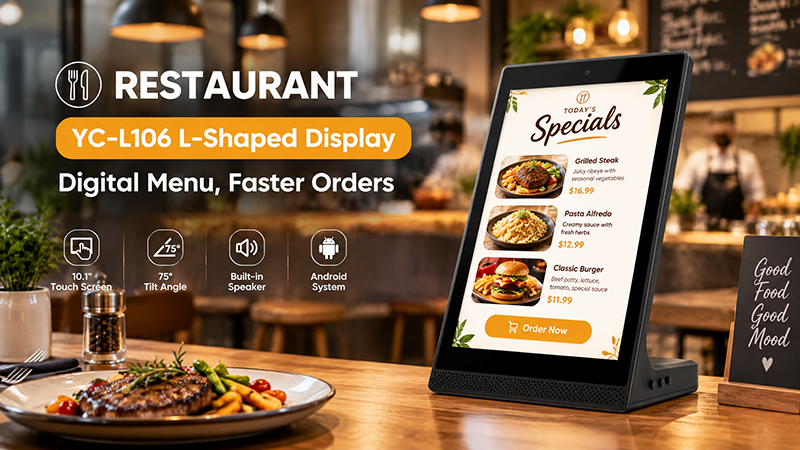
Most restaurant menu boards are primarily intended for viewing rather than direct interaction. Nevertheless, touchscreen displays can serve valuable purposes such as facilitating self-service ordering, enabling product selection, providing interactive menus, and functioning as customer information terminals.
It is essential to differentiate between a menu display and an ordering interface.
A non-touch display positioned above a counter can showcase products, prices, and promotions while staff manage the ordering process. Conversely, an interactive touchscreen may empower customers to explore menu categories, personalize orders, or independently access information, assuming that the application and ordering system are equipped to support these functionalities.
The inclusion of touch capability influences the display assembly, software requirements, and potentially the overall expense. If touch functionality is deemed necessary, it is crucial to verify the touch technology, the number of supported touch points, driver compatibility, and the behavior of the application prior to placing an order.
Portworld provides touchscreen displays and integrated hardware solutions tailored for commercial applications. For restaurant initiatives that merge advertising screens with interactive systems, clients are encouraged to consult with the Portworld team regarding appropriate display configurations and bespoke hardware specifications.
YC-L106 Shopping Mall Banner
9. Take Customization into Account for Restaurant Chains and Equipment Manufacturers
A conventional digital menu board may serve adequately for an individual restaurant. However, restaurant chains, signage integrators, and manufacturers of commercial equipment often have more specialized needs.
For instance, a chain might require uniform displays across various locations, a tailored enclosure that complements existing furnishings, or a branded startup interface. An equipment manufacturer could necessitate a specific motherboard, additional interfaces, or a customized Android setup to ensure compatibility with its proprietary software.
This is where Original Equipment Manufacturer (OEM) and Original Design Manufacturer (ODM) services become significant. Instead of modifying the entire installation to fit a standard product, businesses can collaborate with a manufacturer to assess the hardware and system configuration in relation to the project specifications.
Portworld offers digital signage solutions, embedded motherboards, and OEM/ODM services tailored for commercial hardware initiatives. Depending on the intended use, discussions regarding customization may include:
- Screen dimensions and display arrangements.
- Selection and integration of embedded motherboards.
- Customization of the Android system and preinstallation of applications.
- Requirements for interfaces and peripherals.
- Branding of products and startup screens.
- Adaptation of hardware for specific installation settings.
- Evaluation of samples and preparation for mass production.