L-Shaped Advertising Displays for Retail Counters: A Planning Guide
Retail counters serve as key points of interaction with customers. In electronics shops, cosmetics stores, cafés, supermarkets, and service centers, people often wait, browse, or seek information at the counter. Countertop digital signage offers a practical way to showcase products, share promotions, and enhance the shopping experience.
Among the available options, L-shaped advertising displays are made to suit counter settings. Their angled screens and supporting bases provide a compact format that can face customers without taking up the space required by a large, floor-standing unit.
Selecting the right L-shaped display requires more than considering its appearance. Before installation, businesses should assess screen size, viewing angle, available counter space, brightness, connectivity, and content management.
1. What Is an L-Shaped Advertising Display?
An L-shaped advertising display is a digital countertop screen supported by a base and an upright or angled display panel. Its profile resembles the letter “L,” enabling it to stand securely on a flat counter.
Unlike a conventional flat monitor, the angled panel can face content toward customers while maintaining a relatively small footprint.
Common uses include:
- Retail checkout counters: Advertise discounts, new products, loyalty programs, and seasonal campaigns.
- Cosmetics and beauty counters: Showcase product launches, tutorials, ingredients, and usage recommendations.
- Electronics stores: Present product specifications, comparisons, and accessory promotions.
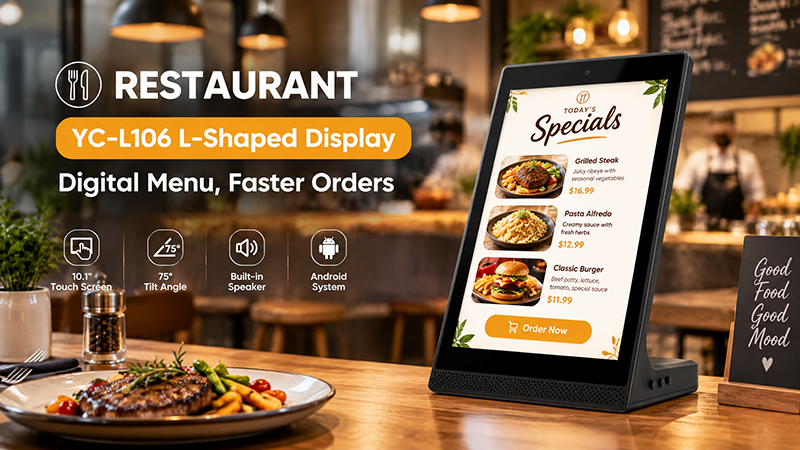
- Restaurants and cafés: Display menus, special offers, and ordering instructions.
- Service counters: Share service details, pricing, and customer guidance.
This format is especially useful for businesses seeking to position advertising near the point of purchase without installing a large screen.
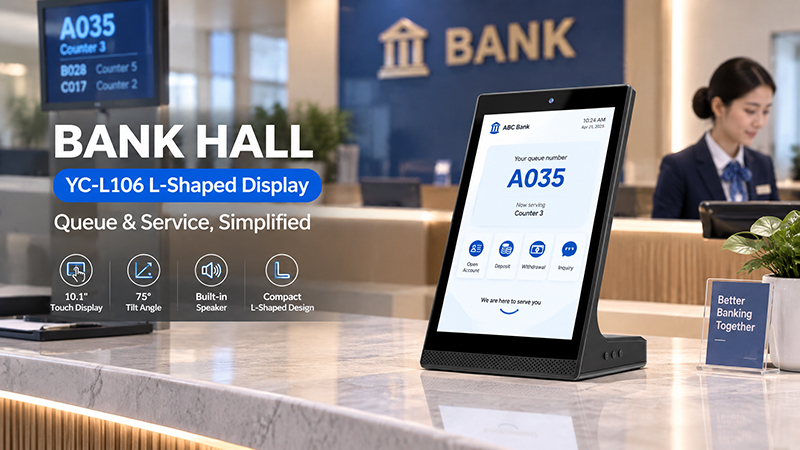
YC-L106 Bank Hall Banner
2. Choose the Right Screen Size
Screen size should be determined by available counter space, viewing distance, and the amount of information being displayed.
Common size options for countertop advertising projects include:
| Screen Size | Suitable Applications |
|---|---|
| 7–8 inches | Compact promotions and product highlights |
| 10.1 inches | Checkout advertising and service information |
| 13.3 inches | Product presentations and promotional videos |
| 15.6 inches | Menus, product catalogs, and larger promotional content |
| 21.5 inches | Larger counters and more detailed interactive applications |
A 7–10-inch screen can be a good choice when counter space is limited and the content is straightforward. A 10.1-inch or 15.6-inch display provides more space for product images, promotional messages, and brief videos.
Larger screens may work well at counters where customers stand farther away or need to view more detailed information. However, the display should not take up so much space that it obstructs checkout equipment, payment terminals, or staff activities.
Before selecting a size, measure the counter’s available width, depth, and height. Account for the base, cable connections, and any mounting accessories.
3. Plan the Viewing Angle and Screen Orientation
One of the key benefits of an L-shaped countertop display is that it can be angled toward customers.
If the screen is too upright, customers seated or standing across a low counter may struggle to see it. If it is tilted too far, reflections may appear and the text may become difficult to read.
Consider the following factors:
- Customer position: Determine where customers typically stand or sit while viewing the display.
- Screen tilt: Choose an angle that makes the content easy to see without requiring customers to adjust their posture.
- Staff visibility: Ensure the screen does not obstruct the cashier’s view of customers or payment equipment.
- Viewing direction: Angle the screen toward customers, not toward the staff behind the counter.
Landscape orientation is well suited to promotional videos, product introductions, and wide images. Portrait orientation may work better for vertical product catalogs, posters, and menu-style content.
The ideal orientation depends on the content’s layout and the amount of counter space available.
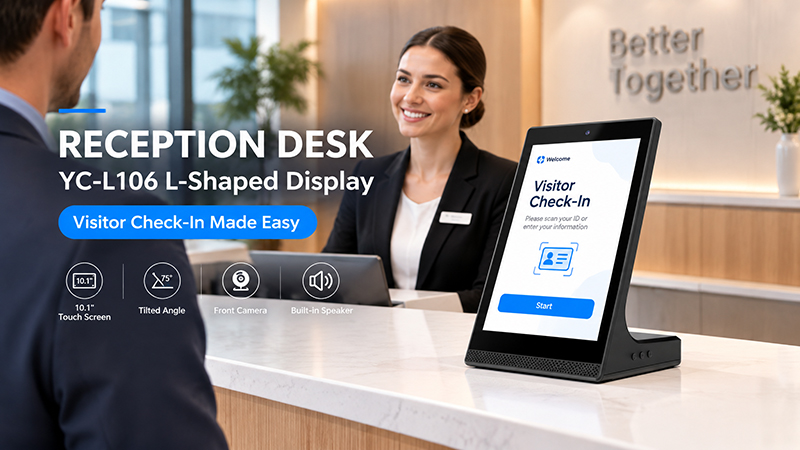
YC-L106 Reception Desk Banner
4. Choose Appropriate Brightness and Display Quality
Retail counters are often exposed to bright overhead lighting, illuminated product displays, and reflective surfaces. A screen that is not bright enough may appear washed out or be difficult to read.
For most indoor countertop uses, a standard commercial display offers adequate brightness. Counters near storefront windows or under intense lighting may need a brighter panel.
Consider these additional display specifications:
- Resolution: A higher resolution can show product details, text, and images more clearly. Select a resolution suited to the screen size and viewing distance.
- Viewing angle: A broad viewing angle is beneficial when customers approach the counter from various directions. IPS panels can be a good choice when viewers commonly look at the screen from the side.
- Touch functionality: Capacitive touch works well for interactive catalogs, product searches, and self-service information. A non-touch display is typically adequate for promotional content that plays continuously.
- Surface treatment: Anti-glare finishes can reduce reflections caused by retail lighting.
- Assess the screen in the store’s actual lighting conditions instead of relying solely on specification sheets.
5. Determine Whether Touch Interaction Is Needed
Not every countertop advertising display requires a touchscreen. Choose the format based on the actions customers are expected to take.
A non-touch display works well for:
- Promotional videos and brand advertising.
- Product images and feature highlights.
- Discount announcements.
- Digital menus and service notices.
- Seasonal campaigns.
- A touchscreen is more beneficial when customers need to:
- Browse product categories.
- Compare product specifications.
- Explore colors, sizes, or available options.
- Read detailed product information.
- Navigate a digital catalog or service menu.
For instance, a cosmetics retailer could use a touchscreen to help customers explore skincare products and application instructions. A café, by contrast, may only need a non-touch display to present its daily specials.
Keep in mind that touchscreen hardware alone does not provide these features. The display must be paired with an appropriate application or content management system to enable customer interaction.
6. Consider Counter Space, Stability, and Cable Management
Countertop displays are used in busy settings where customers and staff frequently handle products, payment devices, and other equipment.
Their physical design should be both practical and visually appealing.
- Compact footprint: The base should sit comfortably on the counter without using more workspace than necessary.
- Structural stability: The display should stay secure during routine daily activity. Take into account the screen’s weight, the base dimensions, and the mounting method.
- Cable routing: Arrange power and network cables neatly to prevent clutter, accidental disconnections, or disruption to transactions.
- Maintenance access: Staff should be able to clean the screen and reach the ports without taking apart the entire installation.
- Enclosure design: Choose materials and finishes suited to the retail environment while offering appropriate protection for the internal hardware.
- For deployments across multiple stores, standardized enclosure dimensions and mounting configurations can also make installation and replacement easier.
7. Assess Connectivity, Operating System, and Content Management
A display’s software and interfaces influence how effectively it fits into the retailer’s existing workflow.
- Android: A practical choice for dedicated advertising apps, interactive catalogs, and tailored retail interfaces.
- Linux: Well suited to embedded applications requiring a controlled software environment or specific system integration.
- Windows: A suitable option when the project depends on existing Windows-based retail applications.
- Connectivity needs vary according to how content is delivered and whether the display must communicate with other devices.
- Wi-Fi: Enables wireless network access and content updates.
- Ethernet: Provides a wired connection for more consistent connectivity.
- USB: Supports local media playback and peripheral connections, depending on the platform.
- HDMI: Connects the display to an external media player or computer.
- PoE: Delivers power and network connectivity through a single compatible Ethernet cable.
For a single display, local media playback may be sufficient. For a retail chain operating across multiple locations, centralized content management can help schedule promotions, update campaigns, and monitor connected devices.
Note that remote management and cloud-based CMS features depend on the software platform selected. They are not automatically available on every Android or Linux display.
YC-L106 Restaurant Banner
8. Match the Display to the Retail Environment
Different retail businesses have different countertop requirements.
| Retail Environment | Recommended Content | Key Planning Priority |
|---|---|---|
| Cosmetics counters | Product information and tutorials | Image quality and touch interaction |
| Electronics stores | Specifications and product comparisons | Resolution and readable text |
| Cafés and restaurants | Menus and daily promotions | Simple content updates |
| Supermarket checkout | Special offers and loyalty promotions | Compact size and stable mounting |
| Jewelry stores | Product highlights and brand videos | Visual quality and presentation |
| Service counters | Pricing and service information | Clear layout and easy maintenance |
A display should help customers make decisions at a specific point in their journey. A checkout screen can highlight complementary products or loyalty programs, while a display at a product counter can offer information to help customers compare options.
Keep the content concise. On a small screen, one central message, a clear product image, and a brief call to action are often more effective than an overload of information.
9. Portworld Custom Display Solutions for Retail Projects
Retail equipment manufacturers and system integrators may require more than a standard countertop display. Each project may call for particular dimensions, viewing angles, interfaces, operating systems, or enclosure designs.
Portworld offers commercial advertising players, touchscreen displays, and embedded computing hardware for retail and other commercial uses. Its compact display range includes 10.1-inch and 15.6-inch models suitable for countertop advertising and interactive information systems.
For projects that require a custom L-shaped design, Portworld can provide OEM/ODM development based on the chosen display and hardware platform.
Customization options may include:
- Display size and touchscreen configuration.
- Android or Linux system customization.
- Mainboard and PCBA design.
- Wi-Fi, Ethernet, USB, PoE, and serial interface options, subject to the selected platform.
- Application preinstallation and automatic startup.
- Custom enclosure, logo, and packaging.
- SDK and technical documentation for supported hardware configurations.
The final mechanical structure, screen angle, base dimensions, and mounting specifications should be confirmed during project design. This helps ensure the display fits the retail counter as built, rather than requiring the counter to be adapted to a standard product.
L-shaped advertising displays offer a compact way to bring digital promotions and product information directly to retail counters. Their angled structure helps present content toward customers while making efficient use of limited counter space.