
Small Digital Signage Displays for Retail Counters: A Selection Guide
Retail counters offer valuable opportunities to communicate with customers. Large digital signage screens capture attention across a store, while smaller displays positioned on counters can deliver targeted messages at the point of purchase.
A compact digital signage display can introduce products, promote limited-time offers, present prices, explain services, or invite customers to join a loyalty program. In restaurants and other service businesses, it can also show menus, ordering instructions, and payment details.
Choosing a small display, however, involves more than finding a screen that fits the counter. Screen size, viewing angle, brightness, touch capability, mounting options, connectivity, and content management all affect how well it performs.
This guide outlines how to select a small digital signage display for retail counters and match its specifications to a range of applications.
1. Establish the Display’s Purpose
Begin by determining what the screen is expected to accomplish. Counter applications vary, so the appropriate hardware and content will depend on how the display is used.
Promotional advertising
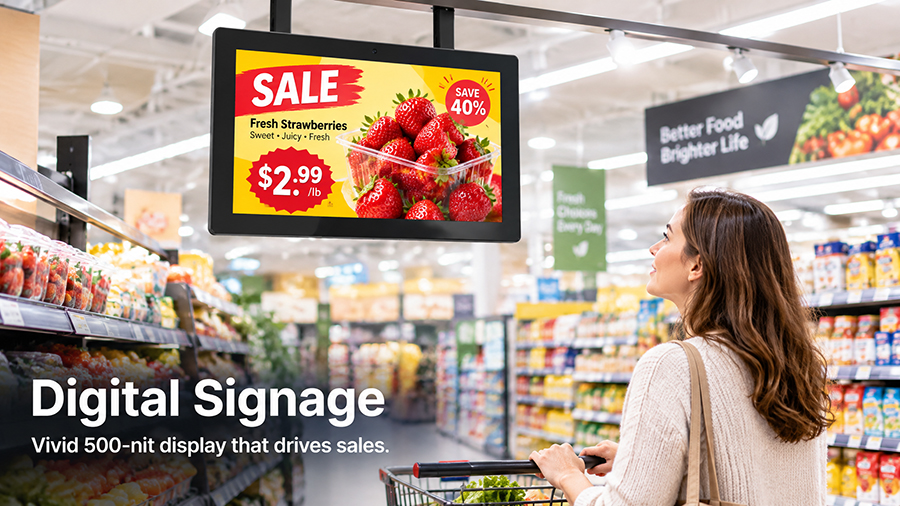
A display positioned near the checkout can feature discounts, seasonal campaigns, new products, and membership offers. A non-touch screen is often adequate for this use. Content should be visually engaging, concise, and easy to grasp at a glance.
Product information
Electronics retailers, cosmetics shops, and specialty stores can use compact screens to present product features, specifications, instructions for use, and recommendations. A touchscreen allows customers to explore further details without needing help from staff.
Digital menus and service information
Cafés, restaurants, salons, and service counters can show menus, prices, available services, and estimated wait times. Compared with printed materials, digital content is easier to update when prices or offerings change.
Customer engagement
Retailers can use counter displays to promote loyalty programs, QR-code campaigns, customer surveys, and digital catalogs. When customers are expected to interact with the screen, touch responsiveness and the supporting application are important considerations.
The intended purpose should guide the screen’s size, orientation, interaction method, and software requirements.
2. Choose the Right Screen Size
Small digital signage displays commonly range from compact shelf-edge screens to larger countertop monitors. The best size depends on available counter space, viewing distance, and the amount of information displayed.
| Screen Size | Suitable Applications |
|---|---|
| 7–10 inches | Compact checkout promotions, product highlights, price information |
| 10.1–15.6 inches | Countertop advertising, product catalogs, menus, customer interaction |
| 17.3–21.5 inches | Larger service counters, interactive catalogs, digital menus |
| 23.8 inches and above | Larger counters or displays viewed by customers from a greater distance |
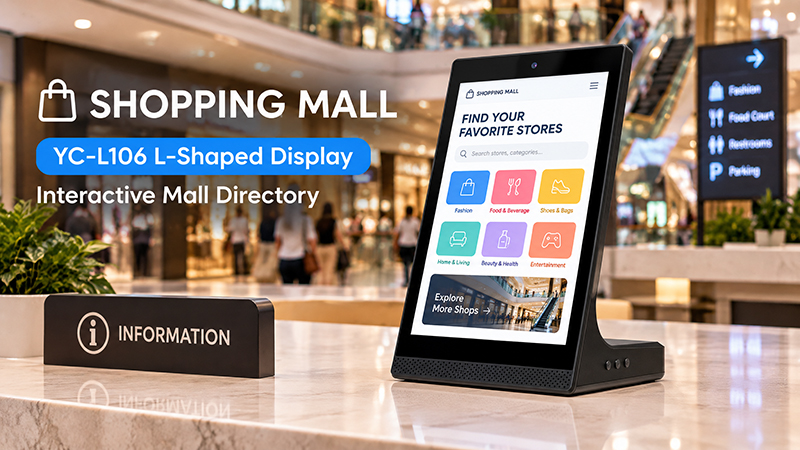
For a compact checkout counter, a 7–10-inch display can show promotions while using minimal space. A 10.1-inch or 15.6-inch screen provides additional room for images, text, and interactive features.
YC-L106 Shopping Mall Banner
A larger display may be a better choice when customers need to review detailed product information or when multiple people will view the screen simultaneously.
Treat these sizes as useful starting points rather than strict standards. Before placing an order, measure the available counter space and check the display’s full dimensions, including its stand or enclosure. A screen that appears compact on a specification sheet may take up more room once installed.
3. Choose the Right Brightness and Viewing Angle
Retail counters often face bright overhead lights, reflective surfaces, and changing ambient conditions. A display that is not bright enough can be hard to read, particularly when installed near a storefront window.
Standard commercial display brightness is generally sufficient for typical indoor retail settings. Areas with stronger lighting or pronounced reflections may need a higher-brightness panel.
Consider the following:
- Checkout counters: Assess the screen’s proximity to overhead lighting and reflective surfaces.
- Storefront counters: Consider natural light levels and exposure to direct sunlight.
- Product display areas: Ensure images and product information are clear from the customer’s usual viewing position.
- Shared counters: Select a panel with appropriate viewing angles when customers approach from multiple directions.
IPS panels can be helpful when customers view the screen from the side instead of straight on. Adjustable screen angles also allow retailers to orient content toward customers.
Match brightness to the installation environment. Higher brightness alone will not necessarily eliminate glare, so screen placement and anti-glare treatments should also be considered.
4. Choose Between Touchscreen and Non-Touch Displays
A key decision is whether customers will need to interact with the screen.
Non-touch displays work well for continuously showing advertisements, product videos, promotional content, and digital menus. They are typically easier to operate, since customers do not need to navigate an interface.
Touchscreen displays are a better fit when customers need to browse products, choose categories, review detailed specifications, or find service information.
For interactive applications, assess:
- Capacitive touch responsiveness.
- Multi-touch capability, if the application requires it.
- Screen durability and surface protection.
- Touch accuracy and performance.
- An interface that customers can use easily.
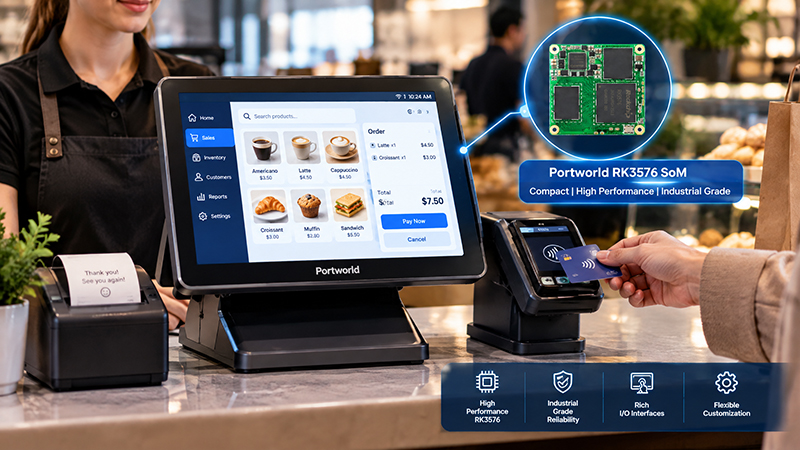
Touchscreen hardware by itself does not create an interactive retail experience. The device also requires appropriate software, such as a product catalog, menu application, ordering interface, or customer engagement platform.
For instance, a cosmetics retailer could use a touchscreen to help customers explore product categories and ingredients. In contrast, a basic promotional display may only need to play a scheduled video loop.
RK3576 SoM Retail POS terminal
5. Consider the Display Design and Mounting Method
Counter space is often scarce, making the physical design of a small digital signage display an important consideration.
Common installation options include:
Desktop stand: A compact stand places the display directly on the counter. It works well for promotional content, menus, and information intended for customers.
L-shaped countertop display: This design angles the screen for comfortable viewing while keeping its base relatively small. It is suitable for checkout areas and product display counters.
Wall-mounted display: When counter space is limited, the screen can be mounted on a wall behind or beside the service counter.
Embedded installation: Some retail fixtures allow a display to be built into a counter or product stand. This provides a more integrated appearance but calls for careful planning of dimensions, ventilation, power supply, and maintenance access.
Before choosing a mounting method, confirm the screen’s dimensions, mounting compatibility, cable routing, stability, and access to power. In customer-facing locations, secure the display and position it so it does not interfere with transactions or routine work.
6. Review Connectivity and Power Options
Connectivity affects how easily a retail display can be integrated with a store’s existing systems.
Common options include:
- Wi-Fi: Enables wireless content updates and network-based management.
- Ethernet: Offers a wired network connection when reliable, consistent connectivity is important.
- USB: Depending on the device, it can be used for local media playback, connecting peripherals, or installing software updates.
- HDMI: Connects the display to an external media player or computer.
- RS232 or RS485: May be necessary for specialized industrial or customized control applications.
- PoE: Supplies power and network connectivity through a single compatible Ethernet cable, which can simplify installation.
A small display does not necessarily need every interface. A standalone promotional screen may only need to play local media, while a connected product information terminal may require Wi-Fi or Ethernet.
For retail businesses operating across multiple stores, network access and remote content management can simplify campaign updates across locations.
7. Select the Appropriate Operating System and Content Management Approach
The operating system should align with the application’s purpose and deployment model.
Android suits many dedicated retail signage applications, customized user interfaces, and interactive product catalogs. It provides flexibility for installing applications and configuring the system.
Linux may be a good choice for embedded projects that need a specialized software environment, tightly controlled system configuration, or integration with other devices.
Windows may be preferable when retailers need to run existing business applications designed for Windows.
Content management is just as important. For a single display, playing content locally from a USB drive may be sufficient. Across multiple stores, a centralized content management system can help administrators schedule campaigns, update media, and manage devices remotely.
However, remote management features depend on the software platform selected. An Android or Linux operating system does not, by itself, provide a complete cloud-based CMS or retail management system.
YC-102P digital signage display
8. Consider Long-Term Reliability and Maintenance
Retail displays may run throughout business hours and, in some locations, for extended periods. Select hardware based on the anticipated operating schedule and installation environment.
Before purchasing, assess the following:
- Commercial-grade display panel and rated operating hours.
- Cooling and heat dissipation capabilities.
- Reliable power supply.
- Secure enclosure and mounting system.
- Accessible ports and provisions for maintenance.
- Software update options and technical support.
For stores with multiple displays, using consistent hardware configurations can also streamline maintenance, software deployment, and replacement planning.
9. Portworld Compact Digital Signage and OEM/ODM Solutions
Retail projects often require specific screen sizes, enclosure designs, operating systems, interfaces, and software. A standard display may not suit every countertop or use case.
Portworld offers commercial advertising players, touchscreen displays, and embedded hardware solutions for retail and other commercial settings. Its product range includes compact displays in formats such as 10.1-inch and 15.6-inch, with configurations tailored to project requirements.
Portworld also offers OEM/ODM customization, including:
- Custom display sizes and touchscreen configurations.
- Android and Linux system customization.
- Mainboard and PCBA design.
- Wi-Fi, Ethernet, PoE, USB, and serial interface options, depending on the platform.
- Application preinstallation and automatic startup.
- Customized enclosures, branding, and packaging.
- SDKs and technical documentation for supported hardware configurations.
For retailers, digital signage integrators, and equipment manufacturers, these capabilities can help deliver countertop displays suited to specific installation spaces and software requirements.


