How to Choose a Meeting Room Booking Display
As companies implement more adaptable office designs and communal meeting areas, the management of room availability has become a crucial aspect of workplace operations. Employees require information on room availability, the timing of the next meeting, and the process for reserving a space without causing disruptions to others.
A meeting room booking display addresses this issue by providing information on room availability and scheduling directly outside the meeting room. When linked to a compatible room-booking platform, it can offer real-time scheduling updates and facilitate the process for employees to locate and reserve meeting spaces.
Nevertheless, not all meeting room displays serve the same function. Some organizations may only need a basic screen indicating whether a room is occupied, while others may necessitate a touchscreen panel that allows for immediate reservations, calendar synchronization, and integration with current office systems.
Selecting the appropriate display involves considering factors beyond just screen size. Aspects such as hardware performance, software compatibility, network connectivity, power supply, installation, and ongoing maintenance all influence the effectiveness of the solution within a real office setting.
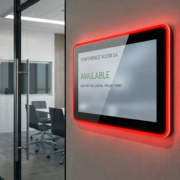
A meeting room booking display refers to a digital screen positioned outside or adjacent to a meeting room, designed to convey information regarding room availability and scheduling.
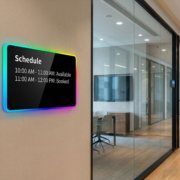
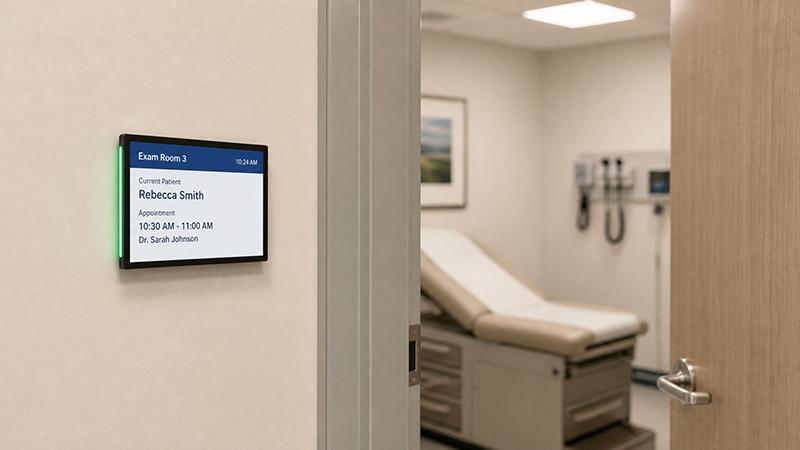
Depending on the specific hardware and software utilized, it can showcase details such as the current meeting, upcoming reservations, room availability, duration of meetings, and other pertinent information. Touchscreen variants may also enable employees to reserve an available room, extend an existing booking, or check future availability directly from the display.
Typically, a meeting room booking system comprises three main components:
- 1. Meeting room display: This component presents the status of the room along with booking details.
- 2. Room-booking software: This software is responsible for managing schedules, reservations, and synchronizing calendars.
- 3. Network connection: This allows the display to access booking information from the appropriate platform.
Certain systems may also integrate with occupancy sensors or room-control systems to provide additional functionalities. The availability of these features is contingent upon the chosen platform and its integration capabilities.
It is important to note that the display itself does not autonomously manage room reservations. The management of scheduling data—its creation, synchronization, and presentation—is dictated by the booking application, server, and calendar integration.
Consequently, assessing software compatibility should be a primary consideration when selecting a meeting room booking display.
meeting room display panel
1. Select the Appropriate Screen Size
The size of the screen influences readability, installation options, and the volume of information that can be presented.
Meeting room booking displays are frequently mounted next to doors, on glass partitions, or on narrow wall areas. In such placements, a smaller screen can convey adequate information without occupying excessive space.
A compact display might suffice to indicate a room name, a green or red availability signal, and the upcoming meeting. Conversely, a larger screen may be necessary when the interface needs to exhibit a comprehensive daily schedule, multiple time slots, or interactive booking features.
When determining the screen size, take into account the viewing distance, the available mounting area, and the quantity of information to be displayed simultaneously.
For instance, a display positioned outside a small meeting room may only need to indicate the room’s availability and the start time of the next meeting. In contrast, a shared conference space with multiple rooms may benefit from a larger interface that showcases more scheduling details.
The objective is to ensure that the room status is easily comprehensible at a glance without overwhelming the screen.
2. Determine If a Touchscreen is Necessary
One of the key considerations is whether staff should have the ability to engage with the display.
A non-touch meeting room display is appropriate when its main function is to display room availability and upcoming bookings. Employees can glance at the screen prior to entering the room, while reservations are handled through a different calendar or booking application.
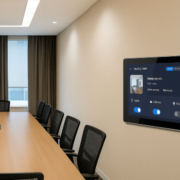
A touchscreen booking panel provides enhanced versatility. Employees can reserve an available room on the spot, review future time slots, or utilize other booking features offered by the software.
meeting room display panel2
| Requirement | Non-Touch Display | Touchscreen Display |
|---|---|---|
| Show room availability | Suitable | Suitable |
| Display upcoming meetings | Suitable | Suitable |
| Book directly at the room | Requires another booking method | Possible with compatible software |
| Navigate a daily schedule | Limited to the designed interface | Can support interactive navigation |
| Hardware complexity | Generally lower | Includes touch hardware and controller |
| Typical priority | Simple status visibility | Interactive room management |
The touch functionality proves advantageous when employees often need to reserve rooms spontaneously. However, if all bookings are managed through a company calendar, a non-touch display may suffice.
For touchscreen models, it is essential to verify that the touch controller, operating system, and booking application are compatible. Merely having a touchscreen does not ensure that the panel can facilitate interactive reservations.
3. Verify Compatibility With Your Booking Software
The compatibility of software is frequently more critical than the physical specifications of the display.
Organizations may already utilize a room-booking platform that integrates with employee calendars, meeting invitations, and shared resources. A new display should seamlessly integrate with the existing system instead of creating a separate booking process that necessitates employees to manage schedules in multiple locations.
Prior to acquiring a meeting room booking display, ensure to confirm:
- Which calendar or room-booking platform the organization employs.
- Whether the platform is compatible with the chosen display or its operating system.
- Whether the display operates through a dedicated application, a browser-based interface, or a device-management platform.
- The frequency at which booking information is synchronized.
- Whether the system accommodates authentication and adheres to the organization’s network policies.
- Whether software updates and device management options are accessible.
- A display utilizing Android may be appropriate when the necessary booking application is compatible with Android or has a web interface that supports it.
- Other projects might necessitate a Windows-based system or a specific software platform.
It is important not to assume that every Android panel is capable of running all meeting room applications. Prior to finalizing the device, one must verify the required Android version, application architecture, background services, and hardware specifications.
For organizations employing specialized scheduling software, testing the actual application on a sample device serves as an effective method to detect compatibility issues at an early stage.
4. Assess Hardware Performance and System Stability
Although a meeting room booking display may seem to have minimal computing requirements, it must still operate its application reliably throughout the workday.
The necessary hardware is contingent upon the software being used. A straightforward room-status interface may function adequately on a relatively compact embedded platform. Conversely, a more intricate application featuring animations, browser-based dashboards, or additional services may require enhanced memory and processing capabilities.
When assessing the embedded hardware, it is essential to consider the processor, RAM, internal storage, operating system, and necessary interfaces.
For instance, Rockchip-based embedded platforms like the RK3566 are utilized in various Android and Linux embedded devices. The suitability of a specific configuration for a meeting room panel is determined by the application’s requirements, supported software, and overall system design.
5. Examine Network Connectivity and Remote Management
The functionality of meeting room booking displays relies heavily on precise scheduling information. Thus, dependable connectivity is crucial.
For permanent installations, wired Ethernet is often an excellent option as it offers a dedicated network connection and can support Power over Ethernet (PoE), provided that both the display and network equipment are compatible.
Wi-Fi may be appropriate in situations where installing Ethernet cabling is challenging or when the chosen device is intended for wireless use.
The decision should take into account the office network, security needs, and the architecture of the application. Certain installations might also require Bluetooth or other interfaces for specific integrations, which should be chosen based on the actual requirements of the project.
Remote management is another vital aspect, particularly when numerous panels are installed across various floors or office locations.
Depending on the software and hardware in use, remote management can facilitate application updates, monitor device status, implement configuration changes, and assist in troubleshooting. These capabilities can minimize the necessity of visiting each room for every required change.
Prior to making a purchase, verify which management features are offered by the booking platform, which are managed by the device’s operating system, and whether any additional software licenses are necessary.
meeting room display panel5
A Comprehensive Checklist for Selecting a Meeting Room Booking Display
Prior to requesting a quote, gather the following details:
- Booking platform: Specify the calendar or room-booking software that the display needs to be compatible with.
- Screen size: Assess the suitable dimensions based on the available mounting area and the distance from which it will be viewed.
- Touch functionality: Determine if employees require the ability to make reservations directly on the display.
- Operating system: Verify the application requirements along with the supported operating system versions.
- Hardware configuration: Outline the necessary specifications for the processor, memory, storage, and any required interfaces.
- Connectivity: Choose between Ethernet, Wi-Fi, and PoE based on the installation setting.
- Mounting method: Review the requirements for wall, glass, or alternative mounting options.
- Security: Ensure that authentication, access controls, data visibility, and update policies are confirmed.
- Device management: Establish how the displays will be monitored, updated, and serviced.
- Customization and quantity: Clarify branding, enclosure, software, sample, and production needs.
Collecting this information enables suppliers to suggest a more suitable configuration and minimizes the likelihood of selecting hardware that is incompatible with the desired booking application.
Portworld offers meeting room display products, embedded hardware solutions, and OEM/ODM customization support for businesses developing smart office and commercial touchscreen systems. By confirming the software, hardware, and installation requirements early, organizations can select a solution that fits their current needs and future deployment plans.