Zigbee vs Wi-Fi Smart Panels: Choosing the Best for Your Smart Home
In the world of smart home automation, the choice of connectivity technology plays a crucial role in how your devices communicate with each other. When it comes to smart control panels, Zigbee and Wi-Fi are two of the most popular wireless communication standards used in smart home setups. Both have their advantages and limitations, and the choice between them depends on factors like range, power consumption, device compatibility, and network reliability.
In this article, we’ll compare Zigbee and Wi-Fi in the context of smart control panels to help you determine which is the best option for your home or office automation.
What is Zigbee?
Zigbee is a low-power, short-range wireless communication protocol designed for connecting IoT (Internet of Things) devices. It is used primarily for home automation and smart home applications, including devices like smart bulbs, locks, thermostats, and smart control panels.
Zigbee operates on the 2.4 GHz frequency and supports a mesh network topology, where each Zigbee device can act as a relay point, extending the range and reliability of the network.
Key Characteristics of Zigbee:
- Low Power Consumption: Zigbee devices are designed to use minimal power, which makes them ideal for battery-operated devices.
- Mesh Networking: Devices communicate with each other, extending the network range by acting as repeaters.
- Range: Typically up to 100 meters in open space, but can vary depending on the environment and device placement.
- Security: Zigbee includes advanced encryption for secure communications.
What is Wi-Fi?
Wi-Fi, on the other hand, is the most widely used wireless communication standard for internet and device connectivity. It uses higher power and bandwidth than Zigbee and is designed for longer-range, high-speed data transmission.
Wi-Fi operates on both the 2.4 GHz and 5 GHz frequency bands and is commonly used for devices like smartphones, laptops, routers, and smart control panels.
Key Characteristics of Wi-Fi:
- High-Speed Data: Wi-Fi supports high-bandwidth applications, making it ideal for data-heavy tasks like video streaming, file sharing, and high-definition displays.
- Wide Range: Wi-Fi typically has a range of up to 100 meters, but its performance can degrade through walls or in dense environments.
- Power Consumption: Wi-Fi uses more power compared to Zigbee, making it less suitable for battery-powered devices.
- Universal Compatibility: Wi-Fi is supported by most devices, making it widely compatible with existing home networks.
Zigbee vs Wi-Fi Smart Control Panels: A Detailed Comparison
1. Range and Coverage
- Zigbee: Zigbee’s mesh network allows multiple Zigbee devices to relay signals to extend the overall range. If you have multiple Zigbee-enabled devices (like sensors, lights, and thermostats), the system can create a larger network and provide better coverage, especially in larger homes or commercial spaces.
- Wi-Fi: Wi-Fi has a better range than Zigbee, but it may struggle to maintain a strong signal in larger homes with multiple walls or obstacles. However, with the right Wi-Fi router or mesh Wi-Fi system, coverage can be expanded throughout the building.
Verdict: Zigbee is better for multi-device setups where range extension through mesh networks is required. Wi-Fi may be preferable for smaller spaces or for use where a single router can cover the entire area effectively.
2. Power Consumption
- Zigbee: One of the most significant advantages of Zigbee is its low power consumption. This is particularly beneficial for battery-powered smart devices, such as motion sensors, smart locks, and even some smart panels. Zigbee-enabled devices can last much longer on batteries compared to Wi-Fi devices.
- Wi-Fi: Wi-Fi generally consumes much more power than Zigbee. This makes it less suitable for devices that need to run on batteries for extended periods. However, Wi-Fi works best for devices that are always plugged into a power source, such as smart TVs, routers, and wall-mounted smart control panels.
Verdict: If you’re working with battery-powered devices, Zigbee is the better option. For wall-mounted smart control panels or devices that are always plugged in, Wi-Fi may be the better choice.
3. Device Compatibility
- Zigbee: Zigbee is often used in more specialized smart home devices, such as lights, smart plugs, and sensors. However, Zigbee requires a hub or gateway (such as Amazon Echo Plus, Samsung SmartThings, or a dedicated Zigbee hub) to connect devices to your network. This could be an extra cost and another device to manage.
- Wi-Fi: Wi-Fi is the most widely supported wireless technology. Wi-Fi smart control panels can integrate seamlessly with most existing devices that use Wi-Fi networks, from smart speakers to cameras, lights, and smart thermostats. The native compatibility of Wi-Fi devices with most home routers makes installation and setup simpler and faster.
Verdict: Wi-Fi is more compatible with a wider range of devices, especially in homes already equipped with Wi-Fi networks. Zigbee may require extra setup through hubs or bridges, making it less convenient for those who prefer plug-and-play solutions.
4. Network Congestion and Interference
- Zigbee: Zigbee operates on the 2.4 GHz frequency, which is also used by Wi-Fi, Bluetooth, and other devices. However, because Zigbee uses a mesh network, it can handle interference better than Wi-Fi and is more reliable in crowded environments with multiple devices.
- Wi-Fi: Wi-Fi devices also use the 2.4 GHz and 5 GHz bands. While 5 GHz provides faster speeds and less congestion, it has a shorter range. In environments with many devices, network congestion can occur, leading to slower speeds and potential interference.
Verdict: Zigbee handles network congestion better due to its mesh network. If you have a crowded smart home with many devices connected, Zigbee can offer more stable performance.
5. Installation and Setup
- Zigbee: Setting up a Zigbee network may require additional components like a hub or gateway to connect all your devices. Once set up, the network can be easily expanded with new Zigbee devices.
- Wi-Fi: Wi-Fi smart control panels are often easier to set up, as they connect directly to your existing Wi-Fi network. No additional hardware like a hub is necessary, making the process faster and more convenient.
Verdict: Wi-Fi panels are quicker and easier to set up, especially if you already have a reliable Wi-Fi network. Zigbee panels may require extra steps for hub setup but offer flexibility with adding more devices.
Portworld’s Smart Control Panels: Zigbee vs Wi-Fi Options
At Portworld, we provide a variety of smart control panels designed for both Zigbee and Wi-Fi environments. Here’s a look at some of our options:
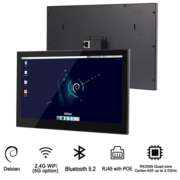
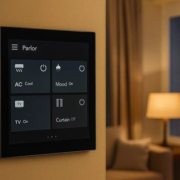
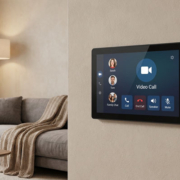
- YC-SM10P: This Wi-Fi-based 10-inch smart control panel is perfect for large-scale smart home automation. Its Android 11 or Linux OS provides seamless integration with Wi-Fi-enabled devices like lighting, HVAC, security systems, and more.
- YC-SM41P: This Zigbee-compatible panel is ideal for connecting and controlling Zigbee-enabled devices in smart homes and commercial spaces. It supports PoE and offers easy integration with Zigbee hubs for multi-device networks.
Zigbee vs Wi-Fi for Smart Control Panels
Both Zigbee and Wi-Fi have their strengths, and the choice between them ultimately depends on your needs:
- Choose Zigbee if you require a low-power, mesh network setup with better coverage for multiple devices in larger buildings.
- Choose Wi-Fi if you prioritize ease of setup, wider device compatibility, and high-speed data for applications like video streaming and multi-media control.
At Portworld, we offer both Zigbee and Wi-Fi-compatible smart control panels to cater to different building sizes and automation requirements. Whether you’re looking for a compact smart panel for your home or a powerful centralized system for your office, we’ve got you covered.